Long USB-C Cable Guide: Choosing a 20Gbps, 4K, 100W Cable from 0.5M to 5M
Long USB-C Cable Guide: Choosing a 20Gbps, 4K, 100W Cable from 0.5M to 5M
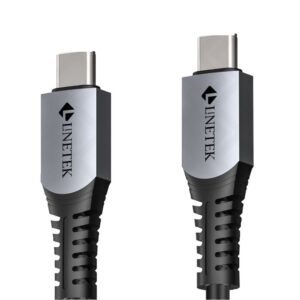
A 1-metre USB-C cable is fine on a laptop bag. But on an office desk, in a meeting room or across a conference table, it rarely reaches. The trouble is that many longer USB-C cables quietly drop features: they charge, but the screen stays blank, or files copy at old USB 2.0 speed. This guide explains what to check before buying a long USB-C cable, and where the Linetek LTK-CC2 20Gbps USB-C to USB-C cable fits in, from 0.5M up to 3M and 5M.
Why do some long USB-C cables not show video?
All USB-C cables look the same from outside, but what they carry inside differs a lot. A basic “charging” USB-C cable has wires only for power and slow USB 2.0 data. It can charge your laptop, but it cannot carry a display signal or fast data. To send video to a monitor, a cable needs the high-speed lanes found in a fully functional USB-C cable.
The Linetek LTK-CC2 is a fully functional USB-C to USB-C cable. One connection carries charging, data and video together.
5 things to check before buying a long USB-C cable
1. Data speed (Gbps)
Look for the bandwidth on the cable’s specifications. 20Gbps is enough for fast external SSDs, docking stations and a 4K display. The LTK-CC2 supports up to 20Gbps. Remember that real speed also depends on the ports at both ends: a 20Gbps cable cannot make a slower port faster.
2. Video support (4K@60Hz)
For monitors, projectors and meeting-room TVs, check that the cable supports video and at what resolution. The LTK-CC2 supports a single 4K@60Hz (or 1080p) display. Your laptop’s or phone’s USB-C port must also support video output (often shown as DisplayPort Alt Mode, or a small display or Thunderbolt symbol next to the port).
3. Charging power (Watts)
Laptops need far more power than phones. A 60W cable may be too little for larger laptops. The LTK-CC2 supports up to 100W (20V/5A) USB Power Delivery when used with a compatible charger, which covers most USB-C laptops including MacBook Pro.
4. Length that suits the setup
Measure the actual distance before buying, and leave a little slack so the cable is not pulled tight. As a rough guide:
Length
Best for
0.5M
Laptop to a dock or hub on the same desk; SSDs and portable drives
1M
Laptop to monitor on a standard desk; phone and tablet charging
2M
Monitor on an arm or wall mount; standing desks
3M
Meeting tables, reception desks, display a little further away
5M
Conference rooms, training rooms, wall displays and projectors
Most 20Gbps USB-C cables are sold only in short lengths. The LTK-CC2 is available in 0.5M, 1M, 2M, 3M and 5M, so long runs do not have to give up 20Gbps, 4K@60Hz or 100W charging.
5. Compatibility with your devices
The LTK-CC2 works with Thunderbolt 4 devices and is backward compatible with Thunderbolt 3, USB4, USB 3.2 and USB 3.1. That means one cable type can serve a mixed office of Windows laptops, MacBooks, tablets and USB-C monitors.
Where the Linetek LTK-CC2 is used
Single-cable desk setups: laptop to USB-C monitor with charging, video and data together
USB-C docking stations and hubs
Meeting rooms: laptop to display or video bar across the table (3M and 5M)
External SSDs and storage drives
eGPU enclosures
Phones, tablets, game consoles and wearables
Quick specifications
Model
Linetek LTK-CC2
Connectors
USB-C male to USB-C male
Lengths
0.5M, 1M, 2M, 3M, 5M
Data
Up to 20Gbps
Video
4K@60Hz
Charging
Up to 100W (20V/5A) PD
Compatibility
Thunderbolt 4; backward compatible with Thunderbolt 3, USB4, USB 3.2, USB 3.1
Buying for an office or project?
Ridhi Infotech, J C Road, Bengaluru, supplies Linetek USB-C cables to businesses across India, with GST invoices on every order. For office fit-outs, meeting rooms and IT teams, use the Bulk Enquiry button on the product page for a quote.
Lorem Ipsum is simply dummy text of the printing and typesetting industry. Lorem Ipsum has been the industry’s standard dummy text ever since the 1500s, when an unknown printer took a galley of type and scrambled it to make a type specimen book. It has survived not only five centuries